

Member Portal Now Live — Your Digital ID and Membership Status Online
The SEAD Visayas Chapter is pleased to announce the launch of our online Member Portal at rhces.com/seadvisayas/portal.
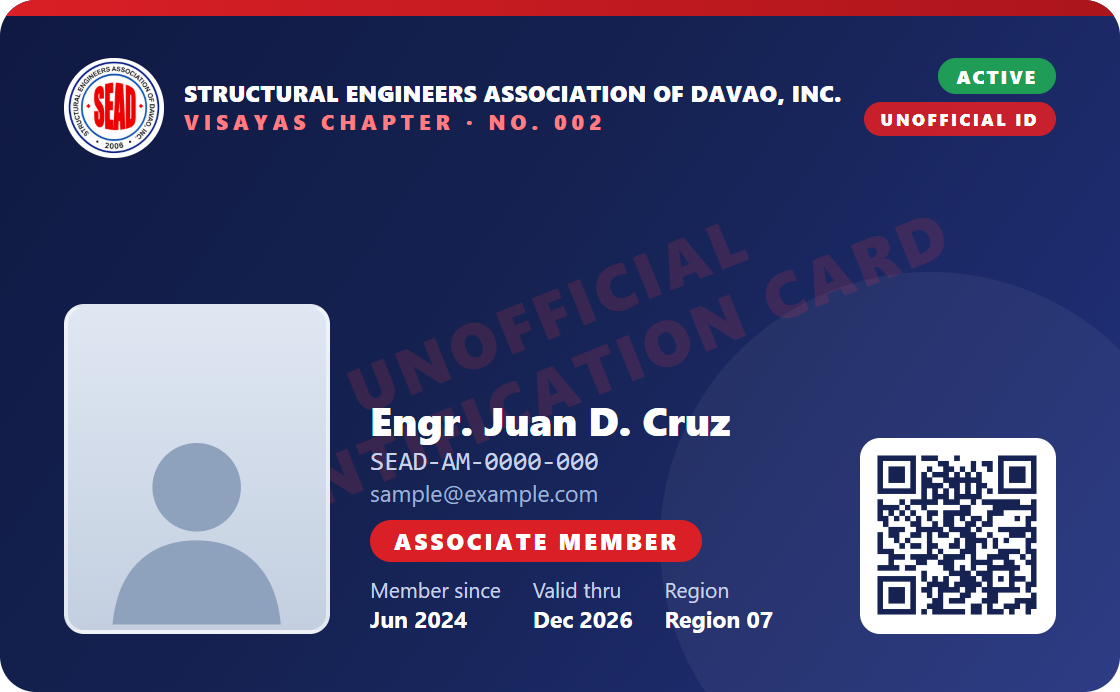
Members can now sign in anytime to view their membership record, check their standing, and carry a digital membership ID that can be verified online against the chapter database.
WHAT YOU CAN DO IN THE PORTAL
1. Digital Membership ID
Your own membership card showing your name, SEAD ID number, membership position, region and date of registration. You may upload your own 2x2 ID picture (square, at least 600x600 pixels, plain white background, JPG or PNG) and download the card to keep on your phone.
Please note: this is an UNOFFICIAL identification card issued by the chapter for convenience and online verification. It does not replace the official membership ID issued by the national office.
2. Membership Status
Your standing is shown as ACTIVE or INACTIVE and updates automatically from the chapter's dues records. A member is ACTIVE when nothing is outstanding for the current year.
3. Annual Dues Record
A year-by-year record of your annual dues since the year you joined, showing which years are paid, waived, or still outstanding.
Annual dues are ₱500.00 per year for Associate and Regular members. Dues for 2025 and 2026 are payable until December 2026. Your status returns to ACTIVE once the Chapter Treasurer records your payment. Officers and members of the Board are waived for their term years.
4. QR Verification
Every digital ID carries a unique QR code. Anyone may scan it to confirm your membership directly against the SEAD Visayas Chapter database — showing your name, SEAD ID, membership position and standing. No login is needed to verify, and the result is read live from our records, so it cannot be forged.
If a copy of your card is ever shared without your consent, you can generate a new QR code from the portal at any time; the old code stops working immediately.
HOW TO CREATE YOUR ACCOUNT
1. Go to rhces.com/seadvisayas/portal and choose "Sign up".
2. Enter your SEAD ID number and your registered email address. Both must match the chapter's records.
3. We will email you a link to set your password — for your security, no password is ever created before you confirm it through that link.
4. Sign in, then upload your ID picture.
PLEASE TAKE NOTE
Your SEAD ID number is required to create an account. Newly approved members receive their SEAD ID from the national office; until the chapter has recorded it, an account cannot yet be created. We will inform you once yours is available.
If your email address is not yet on file with the chapter, please send it to us through the Contact page or our Facebook page so we can update your record. Only members with a recorded email address can register at this time.
For any assistance, please reach us through the Contact page at rhces.com/seadvisayas/contact or message our official Facebook page, facebook.com/sead.visayas.