Introducing RHCES Estimator

What is RHCES Estimator?
RHCES Estimator is a professional Windows desktop application purpose-built for reinforced concrete quantity estimation. It enables structural engineers to compute concrete volume, formwork area, and rebar weight for beams, columns, slabs, and footings — all with real-time 3D visualization and comprehensive PDF/Excel reporting.
Designed for the day-to-day realities of structural engineering practice, RHCES Estimator replaces tedious manual takeoff spreadsheets with an intuitive interface that updates quantities and 3D models in real time as you define your structural elements.
The Problem It Solves
Quantity estimation in reinforced concrete projects is one of the most time-consuming tasks in structural engineering. Traditional approaches involve:
- Manual spreadsheet calculations prone to formula errors
- Tedious element-by-element takeoffs from 2D drawings
- No visual verification — errors only discovered during construction
- Separate tools for concrete, formwork, and rebar estimation
- Difficulty producing professional reports for clients and contractors
RHCES Estimator solves all of these problems in a single, integrated application.
Key Features in Detail
Structural Element Definition
Define beams, columns, slabs, and footings with full geometric parameters (width, depth, length, cover, etc.) and reinforcement details (main bars, stirrups, spacing, layers). Each element type has a dedicated input form optimized for speed.
Real-Time 3D Visualization
As you input elements, a 3D model builds in real time using HelixToolkit. Rotate, zoom, and pan to visually verify your structural layout. Color-coded elements make it easy to identify beams, columns, slabs, and footings at a glance.
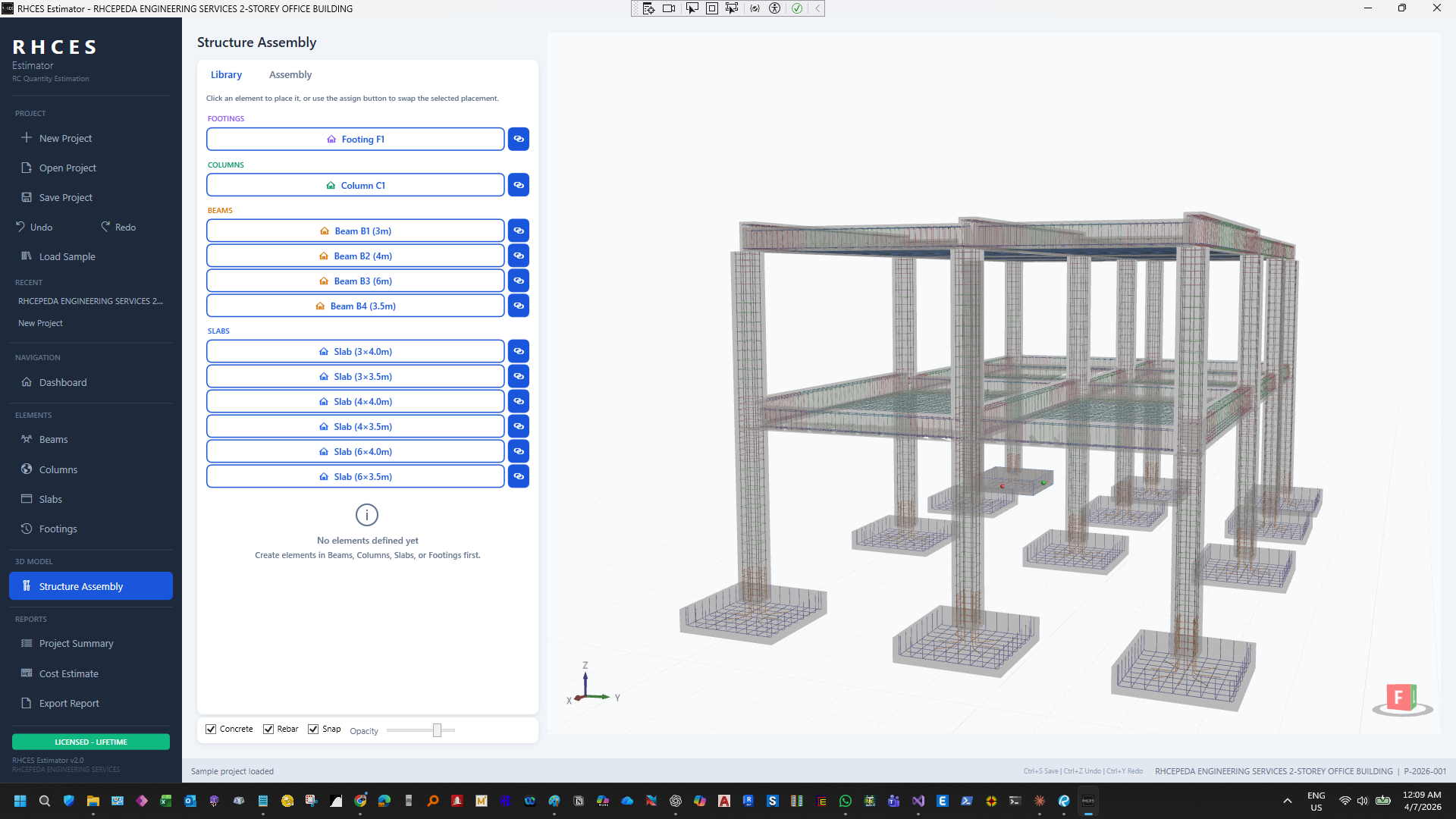
Structure Assembly — Full 3D model with element library panel
Per-Element Quantity Breakdown
Every element shows its individual concrete volume (m³), formwork area (m²), and rebar weight (kg). The summary table aggregates quantities by element type, giving you instant project-wide totals.
App Screenshots
Here is a closer look at each structural element module, showing the dedicated input forms and real-time 3D rebar visualization:
Beams Module
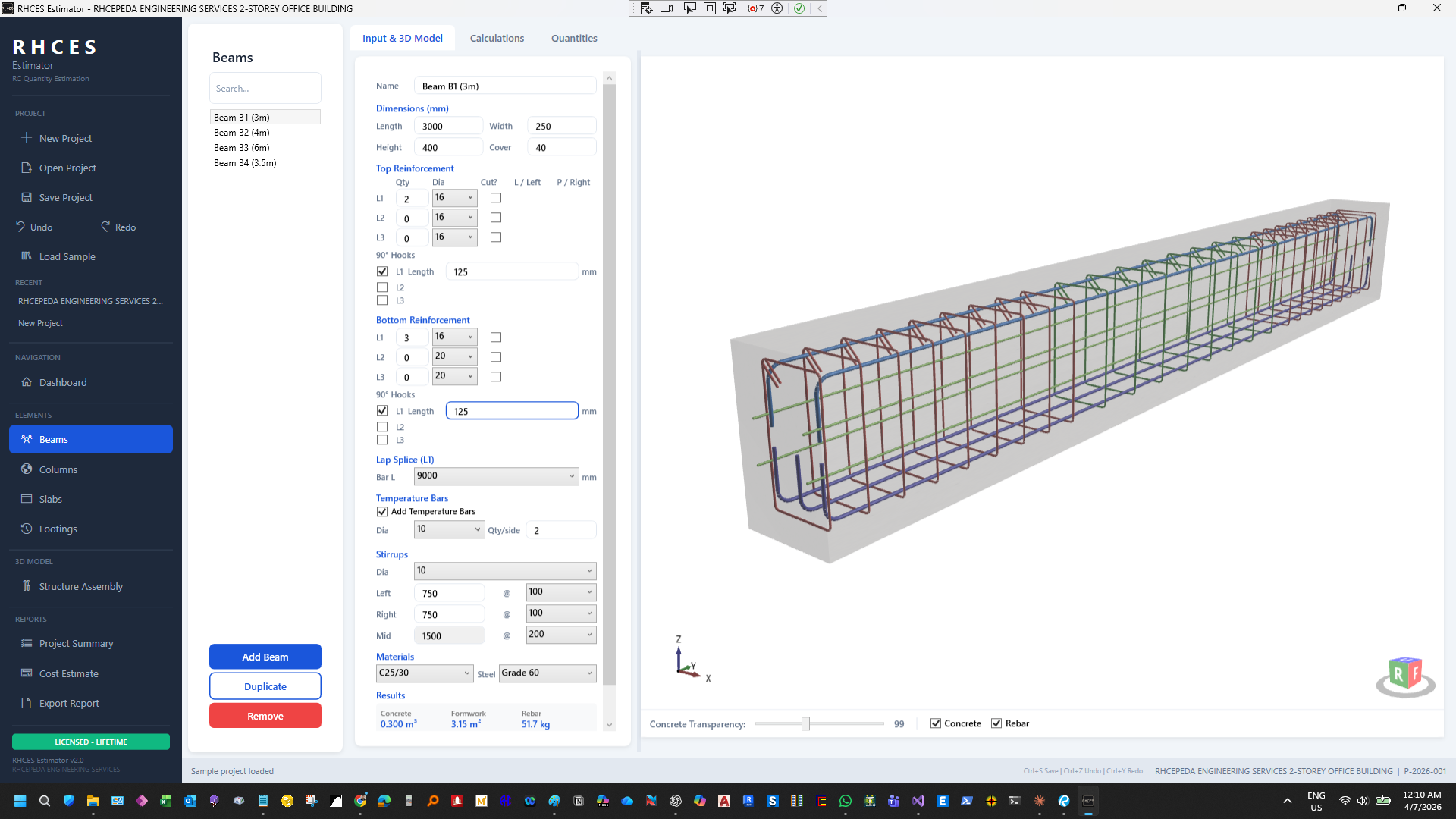
Beam input form with dimensions, reinforcement, stirrups, and 3D rebar model
Columns Module
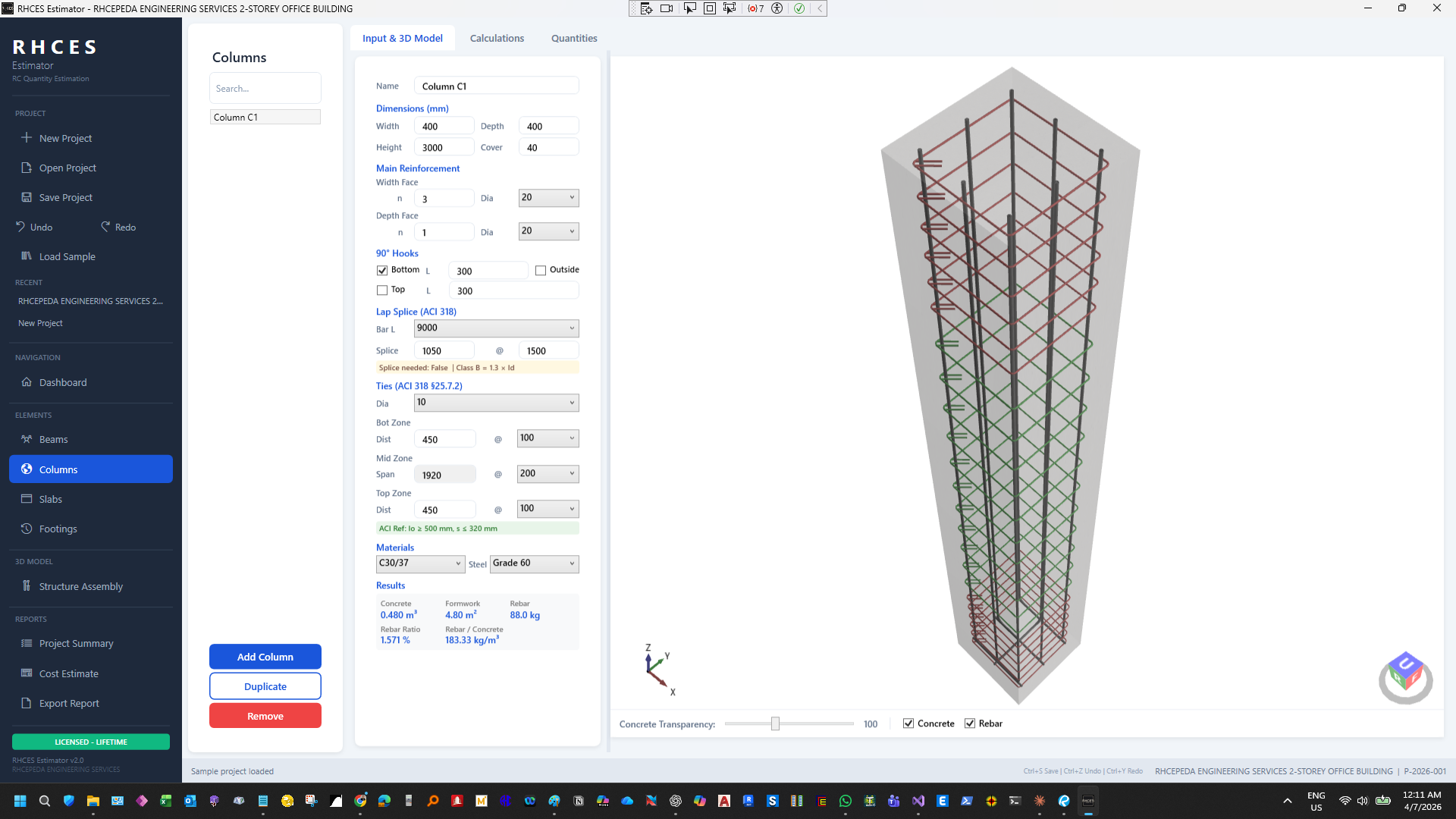
Column input form with dimensions, main reinforcement, ties, and 3D rebar model
Slabs Module
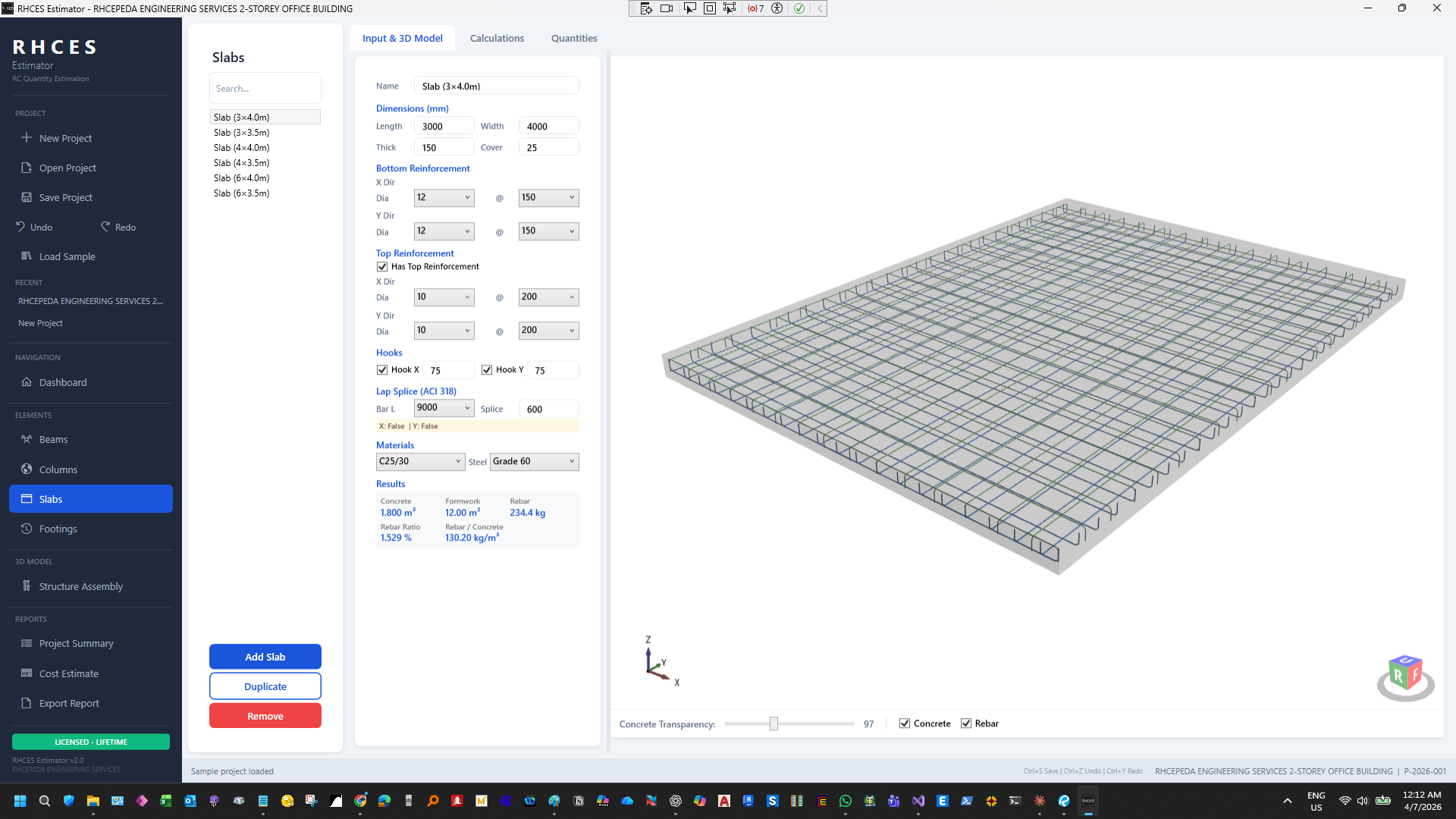
Slab input form with dimensions, bottom/top reinforcement, hooks, and 3D rebar model
Footings Module
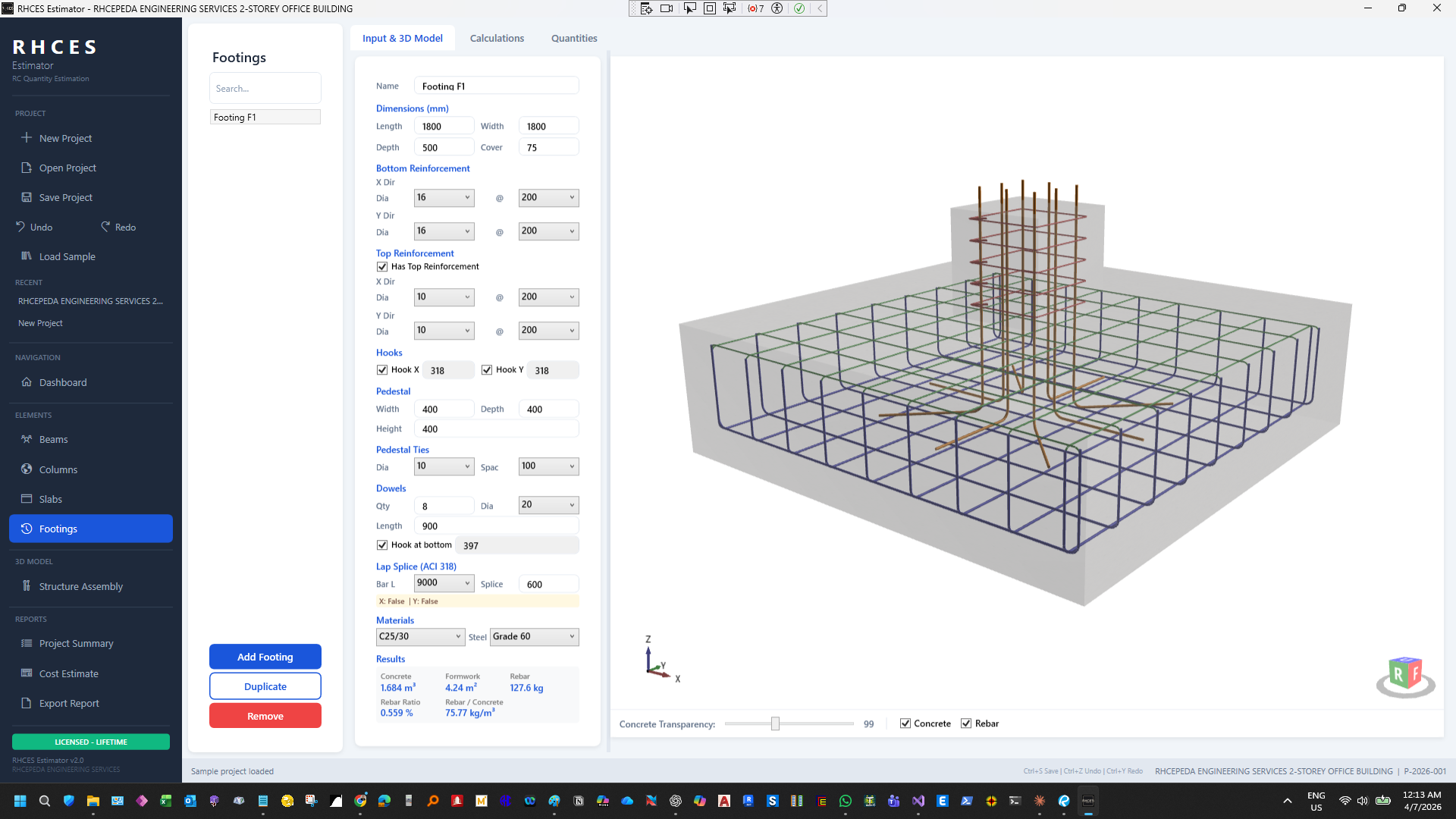
Footing input form with dimensions, reinforcement, pedestal, dowels, and 3D rebar model
PDF Report Generation
Generate professional PDF reports with one click using QuestPDF. Reports include project information, summary tables, detailed per-element breakdowns, and are ready to submit to clients, contractors, or for internal documentation.
Excel Export
Export all quantities to Excel via ClosedXML for further analysis, cost estimation, or integration with your existing workflows.
Undo/Redo & Auto-Save
Full undo/redo support (Ctrl+Z / Ctrl+Y) ensures you never lose work. Auto-save runs every 2 minutes in the background, and you can recover from the auto-save file if the app closes unexpectedly.
Keyboard Shortcuts
Ctrl+N (new), Ctrl+O (open), Ctrl+S (save), Ctrl+Z/Y (undo/redo), Ctrl+P (export PDF), and more — designed for engineers who value speed.
Technical Architecture
- Framework: .NET 8.0 WPF with MVVM pattern (CommunityToolkit.Mvvm)
- 3D Engine: HelixToolkit.Wpf for real-time 3D model rendering
- PDF Generation: QuestPDF for professional-quality reports
- Excel Export: ClosedXML for native .xlsx file creation
- Licensing: Online license validation with offline grace period
- Auto-Update: Built-in update checker with one-click installer download
Pricing & Licensing
7-day free trial — Full access to all features. No credit card required.
Online licensing with automatic updates. Use on 1 machine at a time.
System Requirements
- OS: Windows 10 or Windows 11 (64-bit)
- Runtime: .NET 8.0 (bundled with installer)
- RAM: 4 GB minimum, 8 GB recommended
- GPU: DirectX 11 compatible (for 3D rendering)
- Storage: ~200 MB for installation
- Internet: Required for license activation and updates
Frequently Asked Questions
Yes. RHCES Estimator is designed for professional use. The quantities are computed using standard engineering formulas for concrete volume, formwork surface area, and rebar weight based on your specified bar sizes and spacing.
Projects are saved as .rhces files (JSON-based). You can also export to PDF and Excel at any time.
Currently we offer monthly subscriptions. Annual and lifetime plans are being considered for future releases.
The standard license allows 1 active machine at a time. You can deactivate and reactivate on a different machine as needed.
Version 1.0 covers beams, columns, slabs, and footings. Additional element types (walls, stairs, retaining walls) are planned for future updates.
Comments
Loading comments...
Leave a Comment